Until now, Finelo taught you to read the charts yourself. You learned candlestick patterns, practiced buy, sell, and hold decisions in the simulator, and built the habit of defining an exit before an entry. One thing the app couldn't do for you was watch the market — spotting setups was always fully manual, and markets don't pause while you're at work, at the gym, or asleep.
New in Finelo: AI Trading Bots That Find Setups for You

Finelo's newest feature — AI bots that scan real market data around the clock, explain every setup in plain language, and wait for your approval. Here's what's new and how to try it.
7 min read
Explore Finelo AI trading bots
See how AI bots scan market data, explain setups in plain language, and let you review each practice trade before approving it.
Want to learn more?
See how AI bots scan market data, explain setups in plain language, and let you review each practice trade before approving it.
Try AI botsExplore Finelo's 28-day challenges
Turn learning into a daily habit with guided challenge paths.
That just changed. Meet the Finelo AI bots — the newest feature in the app.
Your bot scans real market data around the clock, spots setups that match your chosen strategy, and alerts you when it's time to review. No complex charts, no jargon: each setup comes explained in plain language, with the entry, stop-loss, and target already laid out. The AI does the scanning. You make the call.
Why scan charts yourself when AI works 24/7?
Anyone who has tried learning to trade on their own knows the pain points:
- Hours staring at charts you don't fully understand
- No way to watch markets while you sleep or work
- Emotional decisions — FOMO on the way up, panic on the way down
- No clear exit plan, no defined target or stop
The new AI bots were built to remove exactly these problems — without removing you from the decision. The bot reads the charts and explains each setup, so you learn while you practice. It scans around the clock, so setups don't slip past while you're away. Every setup comes with a preset stop-loss and target. And it never acts alone: you approve or decline in one tap, and nothing happens without you.
When the bot spots something worth your attention, it taps you — not the other way around.
Three taps to your first practice trade
Here's the whole flow — this is genuinely all there is to it.
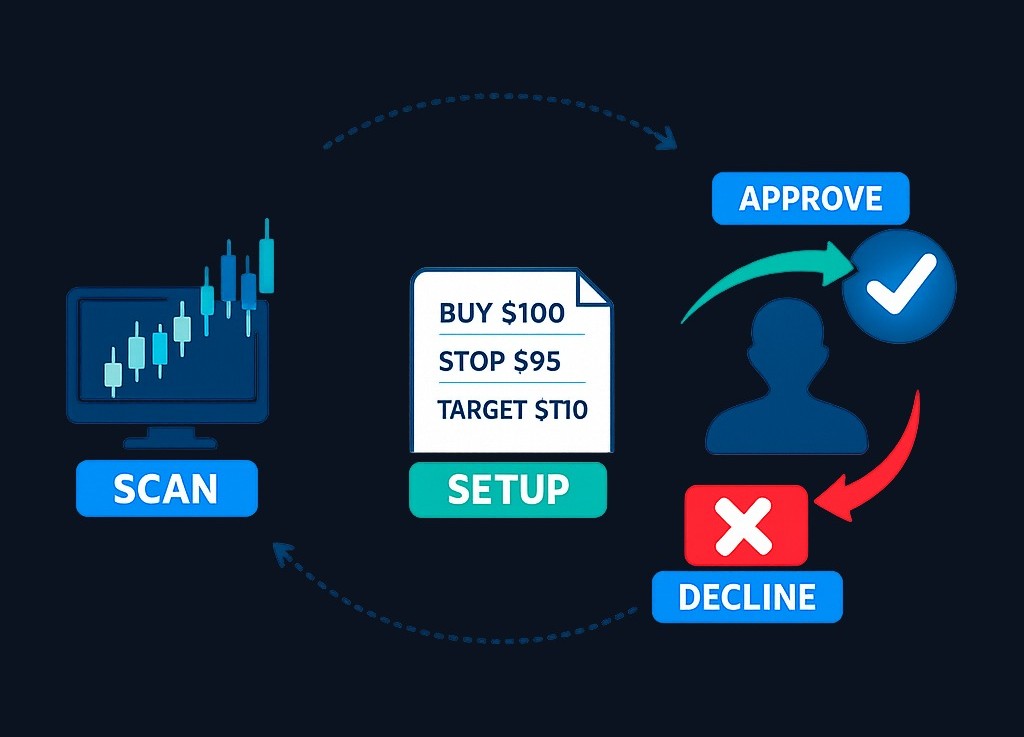
1. The bot scans 24/7. It watches your selected stocks around the clock for setups that match its strategy — on real market data, the same data the Finelo simulator has always used.
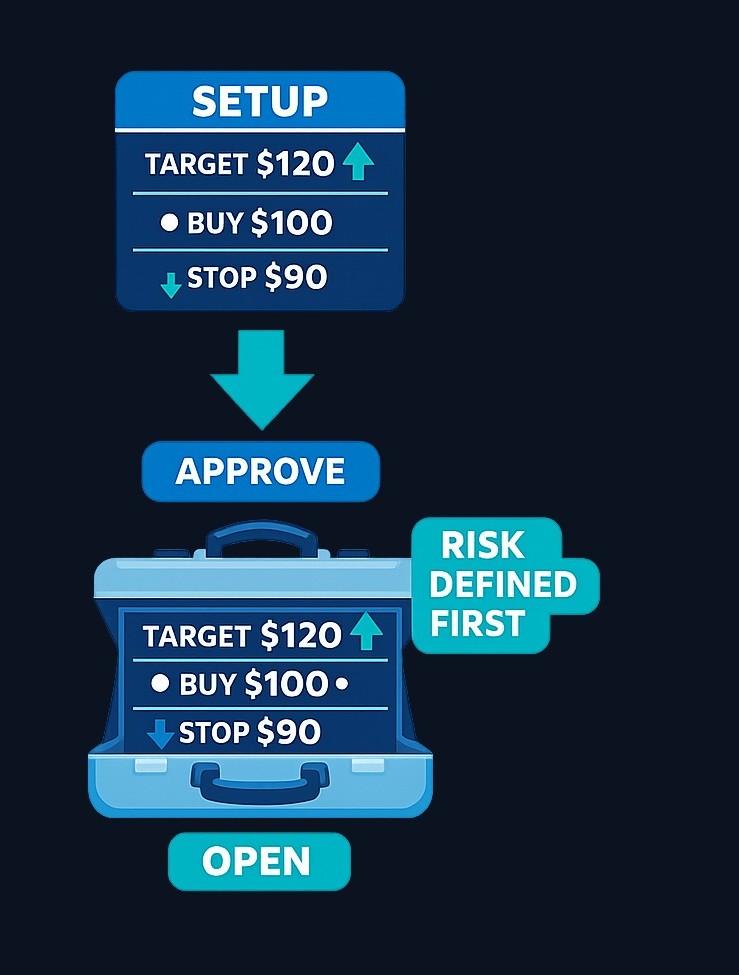
2. You review. When a setup is found, you get a clean card: entry, target, stop-loss, and the reason behind it — explained in plain language, not indicator jargon. For example, a signal card might read: "AAPL dropped 5% this week. Bot detects oversold momentum and a reversal pattern from this support zone." No black box, no guessing why. (One habit worth keeping from our chart pattern guides: any historical statistic describes past samples, not your next trade.)
3. You tap Approve. The position opens in your practice portfolio with your virtual balance, and closes at the preset target or stop. If you don't like the setup, tap Decline and it simply expires. Either way — you're always in charge.
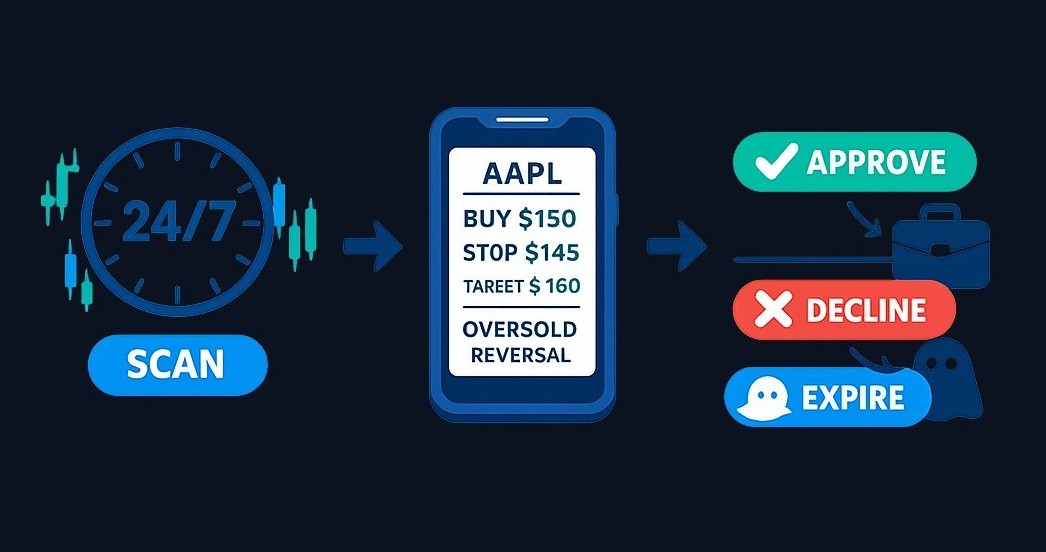
Notice what's built into every single signal: the exit plan exists before the entry does. The stop defines what you're risking, the target defines what you're aiming for, and you see both upfront. Decision quality comes from defining the exit before the entry — regular readers will recognize that line from our pattern guides. That discipline used to be something you had to build yourself; in the bot flow, it's the default.
Explore Finelo AI trading bots
See how AI bots scan market data, explain setups in plain language, and let you review each practice trade before approving it.
Pick the bot that fits your style
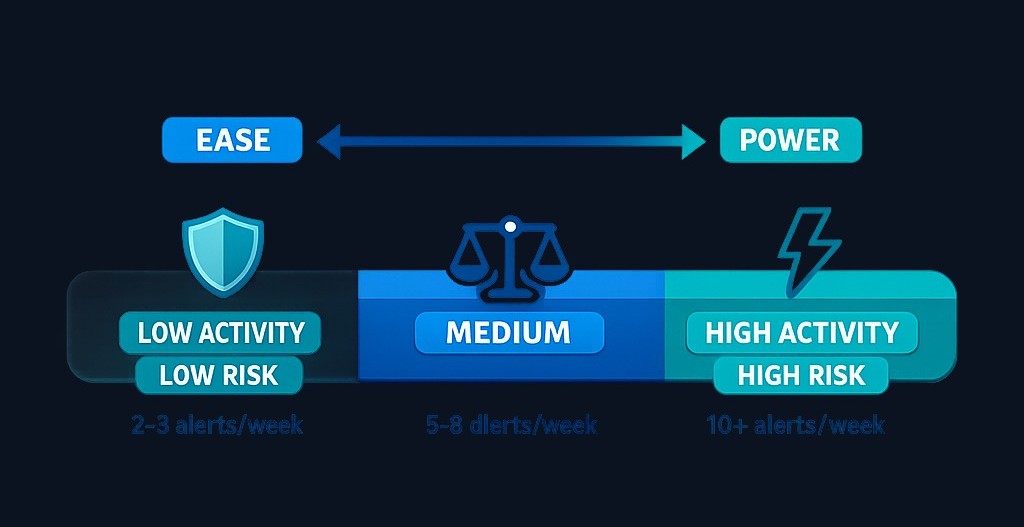
There isn't one bot — there's a lineup, each with its own risk profile and approach. You choose the one that suits you; the app doesn't pick it for you.
| Bot | Activity | Style | Volatility |
|---|---|---|---|
| AI Capital Guard | Low | Conservative | Low |
| AI Apex Select | Low | Conservative | Moderate |
| AI Balanced Alpha | Moderate | Balanced | Moderate |
| AI Market Chameleon | High | Moderate risk | High |
| AI Momentum Max | High | Aggressive | High |
| AI Power Surge | Very high | Aggressive | Very high |
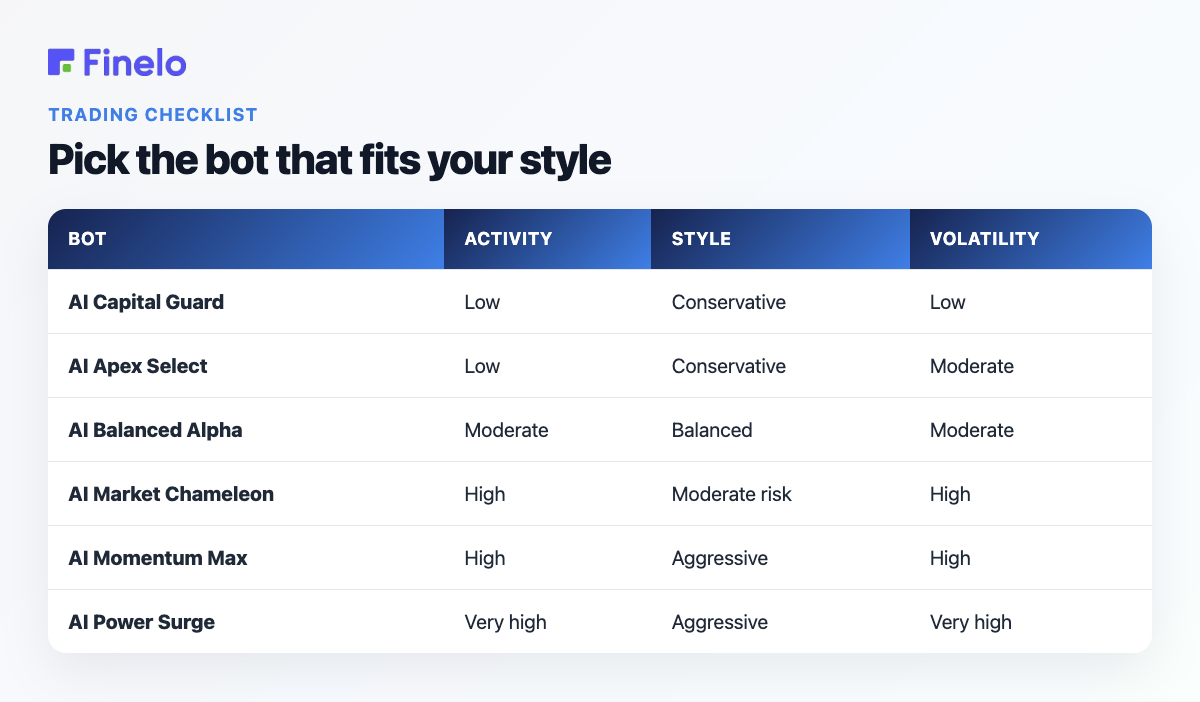
New to all of this? Start with AI Capital Guard — low activity, conservative, low volatility, so you have time to actually read and understand each setup. Comfortable with the flow? The higher-activity bots will keep your phone busier.
One honest note before you pick: higher activity and volatility means more alerts and larger potential swings — in both directions. More signals is not automatically more wins. Choose what matches your risk tolerance, not what sounds most powerful.
Everything you need, nothing you don't
What makes this feature different from the "AI trading" noise elsewhere:
Risk-first by design. Every setup comes with a preset stop-loss, so risk is defined before entry — the same principle our guide to risk management in trading is built on.
Explains every move. No black box. Each setup includes a clear reason in plain language, so you learn to read the market while you practice. This is still Finelo: the feature teaches while it works.
Always on. The bot scans while you're at work, at the gym, or asleep.
A closed practice loop. Demo mode runs on virtual funds and real market data — no deposits, no withdrawals, no broker connection. The only cost of a wrong call is the lesson.
You stay in control. The bot never opens a position without your approval. Every decision is yours.
How to get the most out of it in your first week
Our suggestion: treat the bots as a training partner, not an oracle. Approve some setups, decline others, and pay just as much attention to the ones that hit the stop-loss as the ones that reach the target — the failed setups teach more, exactly as with chart patterns.
The skills you've built reading our pattern guides transfer directly here. When the bot flags a reversal setup near support, you can check its reasoning against your own: does the structure look like something you'd have flagged yourself? Is the risk-reward sensible? That back-and-forth — bot proposes, you evaluate — is where the learning actually happens. If you're new to the practice environment itself, the guide to the trading simulator for beginners walks through how it works.
The bot does the scanning. You do the deciding. That division of labor is the entire feature — and it's live in the app now.
Finelo is an educational product. The practice environment uses virtual funds and real market data and is not a brokerage. Brokerage connection availability depends on your region. AI-generated signals are educational, involve substantial risk, and are not financial advice. Past performance does not guarantee future results. Final trading and investing decisions are yours and are made through your own brokerage account when you choose to act.
Frequently asked questions
What is the new AI bot feature in Finelo?
It's a set of AI bots inside the Finelo app that scan real market data around the clock, spot setups that match a chosen strategy, and explain each one in plain language. You review the entry, stop-loss, and target, then approve or decline in one tap. The bot never opens a position without your approval.
Do the Finelo AI bots trade automatically?
No — and that's by design. The bot does the scanning and the explaining; you make the call. Once you approve a setup, it runs in your practice portfolio with a preset stop-loss and target already attached. Every decision to enter is yours.
Can I try the AI bots without risking money?
Yes — that's the whole idea. Finelo is an educational product: the practice environment uses virtual funds and real market data, with no deposits, no withdrawals, and no broker connection. It's a closed practice loop, so the only cost of a wrong call is the lesson.
Which AI bot should I choose?
Each bot has its own risk profile and approach, from conservative low-activity options to aggressive high-volatility ones. Higher activity means more alerts and larger potential swings in both directions, so pick the one that matches your risk tolerance — the app doesn't pick it for you.
ai trading botfinelo ai botnew featuretrading practice
Explore Finelo AI trading bots
See how AI bots scan market data, explain setups in plain language, and let you review each practice trade before approving it.
About the author
Finelo Team
The Finelo Team creates practical investing and trading education designed to help beginners learn faster with structured challenges, simulator practice, and bite-sized lessons.
Keep reading — Related articles
AI Trading
ChatGPT for Stock Trading: What It Can and Can't Do
ChatGPT can help you learn stocks, summarize filings, and draft research prompts — but it cannot trade for you, predict prices, or be trusted blindly on numbers. Here's an honest beginner guide to using it as a research assistant.
Finelo Team
AI Trading
Does AI Trading Work? What Beginners Should Know Before Trusting a Bot
Two camps say bots either print money or scam everyone. The truth is boring and specific: it depends on the strategy, the data, and whether a human is still paying attention.
Finelo Team
AI Trading
How Do AI Trading Bots Work? A Beginner’s Guide
Follow an AI trading bot from incoming data to a proposed action, approval and execution. Learn what to check about testing, permissions and costs.
Finelo Team