A trading simulator is easy to find and easy to misuse. You download a stock market simulator app, get a pile of virtual cash, and start clicking buy and sell. A week later you've placed two hundred trades and learned almost nothing.
Trading Simulator for Beginners: What to Practice Before Your First Real Trade
Seven specific skills to practice in a trading simulator, what a simulator can and can't teach, and how to choose one without getting distracted by features that don't matter.
7 min read
Practice trading with Finelo
Practice in a simulator, learn with bite-sized lessons, and build confidence before risking real money.
Want to learn more?
Practice in a simulator, learn with bite-sized lessons, and build confidence before risking real money.
Explore FineloExplore Finelo's 28-day challenges
Turn learning into a daily habit with guided challenge paths.
A trading simulator for beginners is most valuable not as a game, but as a place to practice a small set of decisions until they feel automatic. The tool itself barely matters. What you do inside it is the whole point.
Here's what a beginner should actually practice in a simulator, what it can and can't teach, and how to choose one without getting dazzled by features you'll never use.
What a trading simulator is
A trading simulator, also called a stock market simulator, a paper trading simulator, or a simulated trading app, lets you place trades with virtual funds instead of real money. You get a virtual portfolio (sometimes called a mock portfolio) funded with virtual cash, and you use that virtual buying power to buy and sell against live or near-live market prices.
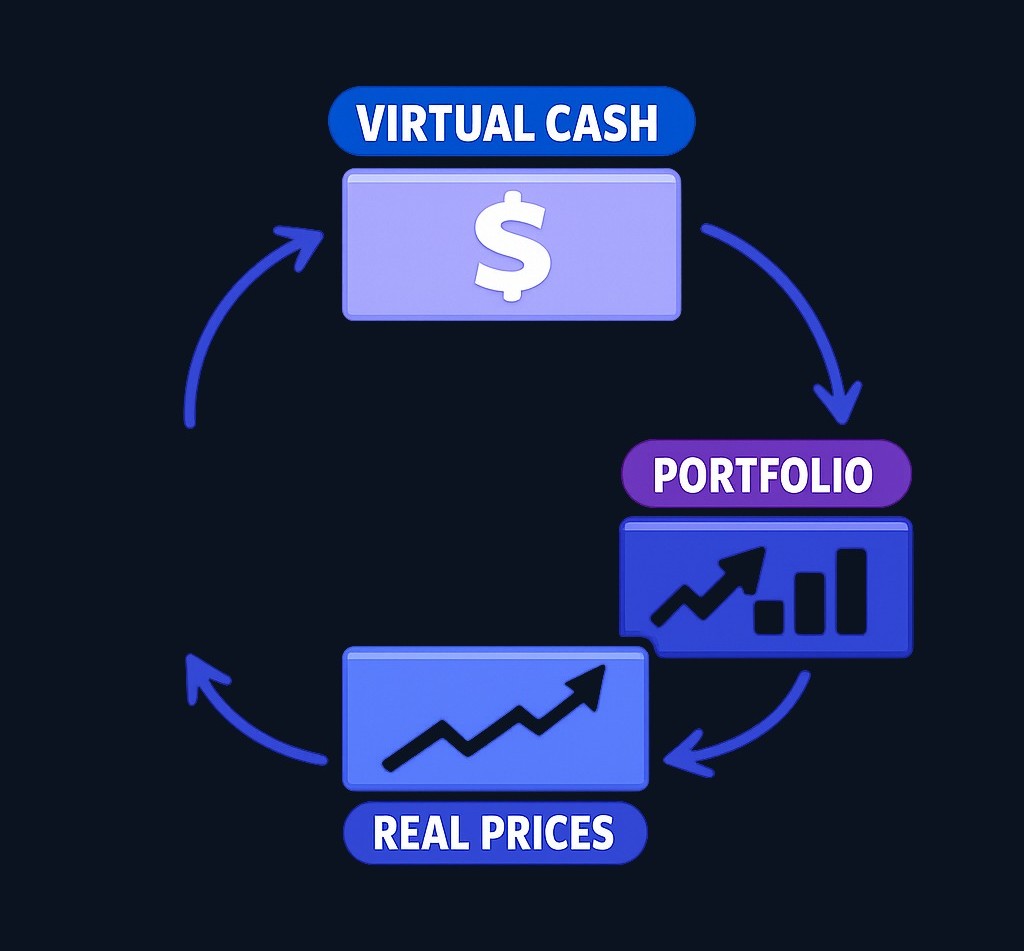
Demo practice does not touch a real brokerage account. In Demo mode, there are no deposits, no withdrawals, and no brokerage connection; it's a closed practice loop. Whether a tool brands itself a virtual stock market simulator or something fancier, the core idea is identical.
If you want the full definition and a bit of history, start with What Is Paper Trading? A Beginner's Guide to Practicing Without Real Money and come back.
What a simulator can teach beginners
Used with intent, a simulator is a strong teacher of mechanics and habits — the parts of trading you can rehearse without anything real on the line.
A good stock market simulator for beginners lets you practice:
- Order mechanics. Filling out an order ticket, and seeing how a market order and a limit order behave differently.
- Chart observation. Reading charts and a few basic technical indicators to notice how price moves, without trying to predict it.
- Watchlist habits. Keeping a small watchlist and following the same handful of markets day to day.
- Journaling. Writing your reasoning in a trade journal before the result is known.
- Tracking and review. Using a portfolio tracker and your performance history to spot patterns across many trades.
That last point is where a simulator quietly earns its keep. A single trade teaches little. Fifty trades you reviewed teach a lot.
What a simulator cannot fully teach
A simulator is honest practice, not a dress rehearsal for the real thing. Some lessons only arrive when real money is involved, and pretending otherwise sets beginners up for a shock.
- Emotion. Virtual losses sting for a second; real ones change how you sleep. The fear that makes you abandon a plan rarely shows up over virtual cash.
- Execution differences. Live markets have an execution difference that simplified simulators smooth over: real spread, real slippage, and fills that aren't guaranteed at the price you saw.
- Liquidity and size. A position that fills instantly in practice can move the market in reality.
- Real capital pressure. Sitting through a drawdown or a burst of market volatility feels completely different when the balance is yours.
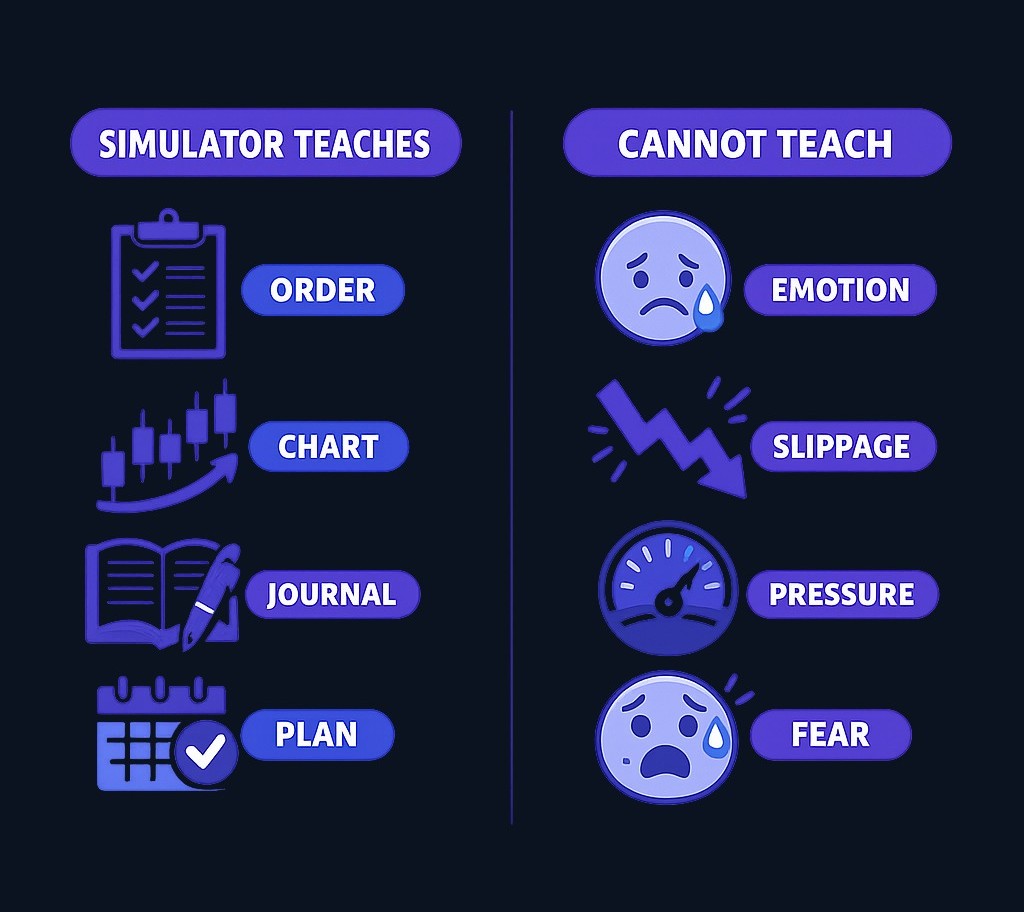
This is also the first answer to "brokerage account vs simulator": a simulator is for learning decisions; a brokerage account is where real money and real consequences live. Treat a clean simulator run as evidence you practiced, not proof you're ready.
Practice trading with Finelo
Practice in a simulator, learn with bite-sized lessons, and build confidence before risking real money.
7 skills to practice in a trading simulator
A trading simulator for beginners works best with a short, repeatable agenda. Practice these seven things. They're decisions, not features, and they transfer to whatever you do next.
1. Reading price movement
Watch your watchlist long enough to describe what a market normally does: where it stalls, how far it travels on a quiet day. Observation first, opinions later.
2. Choosing the right order
Practice when a market order makes sense versus a limit order. The order ticket is where good intentions become real decisions, so fumble it here, not later.
3. Planning your exit
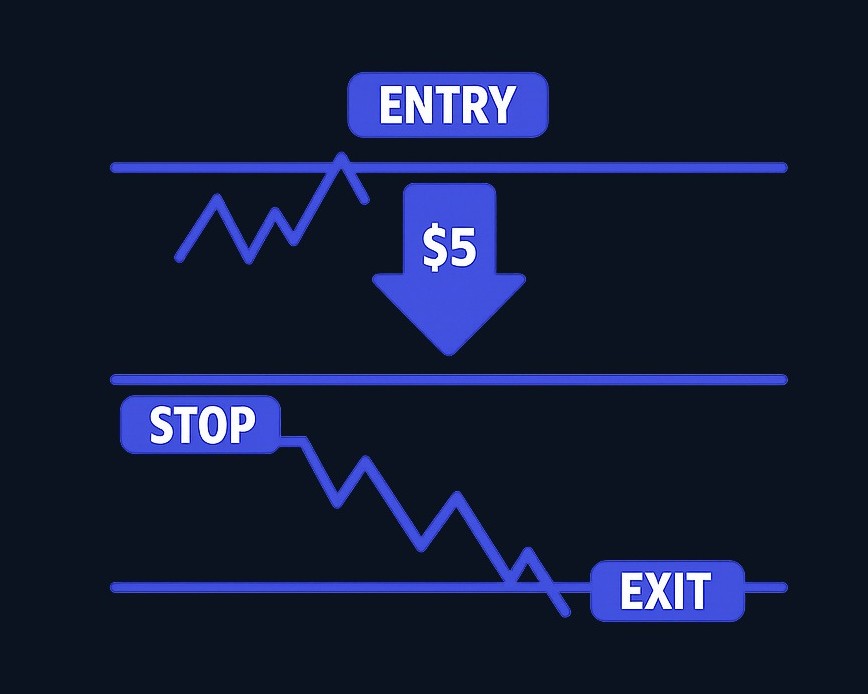
Before you enter, decide where you're wrong. That pre-set line is the stop-loss concept, and rehearsing it is more valuable than any winning streak.
4. Sizing a position
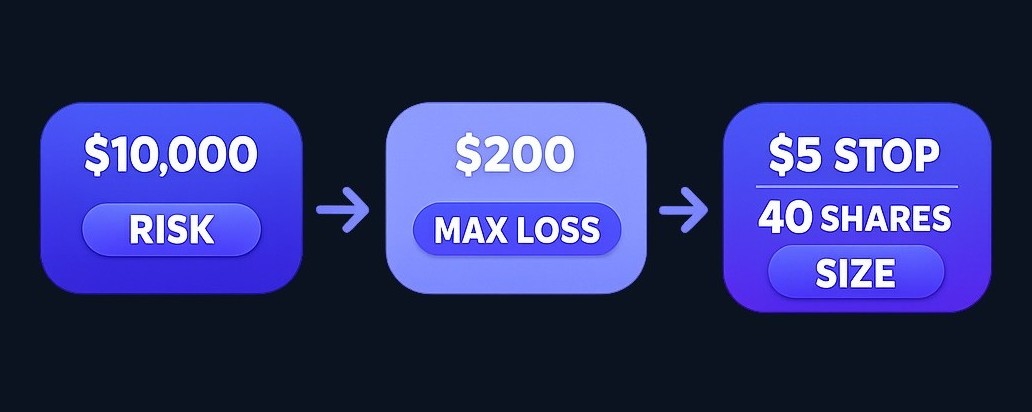
Practice position sizing against simple risk limits — a small slice of the virtual balance per idea, not an all-in bet. If a simulator starts you with a hypothetical $10,000 in virtual funds, risking a few hundred per trade keeps it realistic. (Figures are illustrative examples, not recommendations.)
5. Making the no-trade call
The hardest skill is doing nothing when nothing fits your plan. "No trade" is a decision worth logging, not a wasted day.
6. Journaling every decision
Write the reason, the entry, and the planned exit before you click. A simulator without a journal is just a clicker.
7. Reviewing your history
Read your performance history back weekly. Look for repeating mistakes, not just the score. This is the loop that turns practice into skill.
Here's the same agenda as a quick checklist:
| Skill | What you're practicing | Where it lives in the simulator |
|---|---|---|
| Read price movement | Trend and patience | Charts, watchlist |
| Choose the right order | Market vs limit, and why | Order ticket |
| Plan your exit | Pre-deciding where you're wrong | Stop-loss concept |
| Size the position | A small slice, not the account | Position sizing, risk limits |
| Make the no-trade call | Discipline to skip a setup | Your judgment, not a button |
| Journal the decision | Reasoning before result | Trade journal / notes |
| Review the history | Finding patterns over time | Portfolio tracker, performance history |
Simulator practice mistakes beginners make
Most wasted simulator time comes from a few predictable habits:
- The game mindset. When a simulator leans on a leaderboard and other game mechanics, it's tempting to play for the high score instead of decision quality. The score is not the skill.
- Oversized virtual positions. Going all-in because it's "only" virtual money trains a reflex you don't want.
- Switching rules mid-trade. Moving your stop because a position turned against you isn't flexibility; it's a habit that gets expensive later.
- Ignoring your losses. Losing trades hold more information than winning ones. Skipping the review wastes the best lessons.
- Chasing leaderboard wins. Trading more to climb a ranking is the opposite of patient practice.
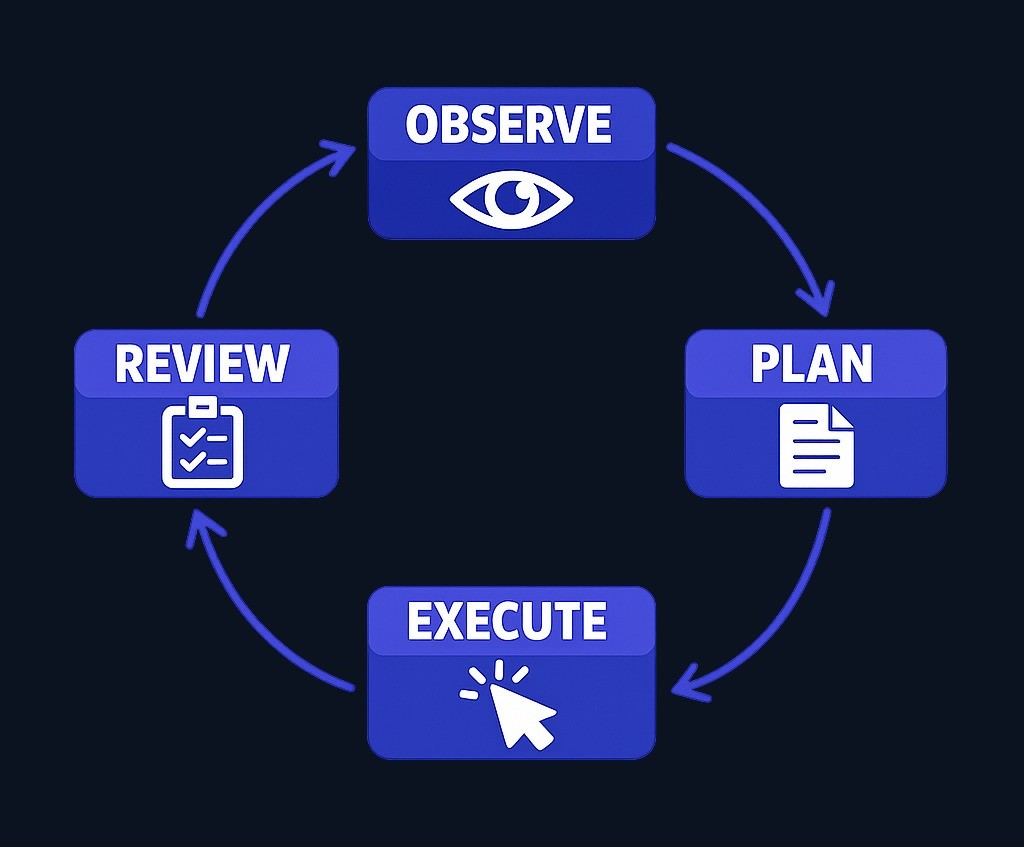
The best simulator isn't the one that lets you click the most. It's the one that helps you run a decision loop: observe, plan, simulate, review.
How to compare simulator features without getting distracted
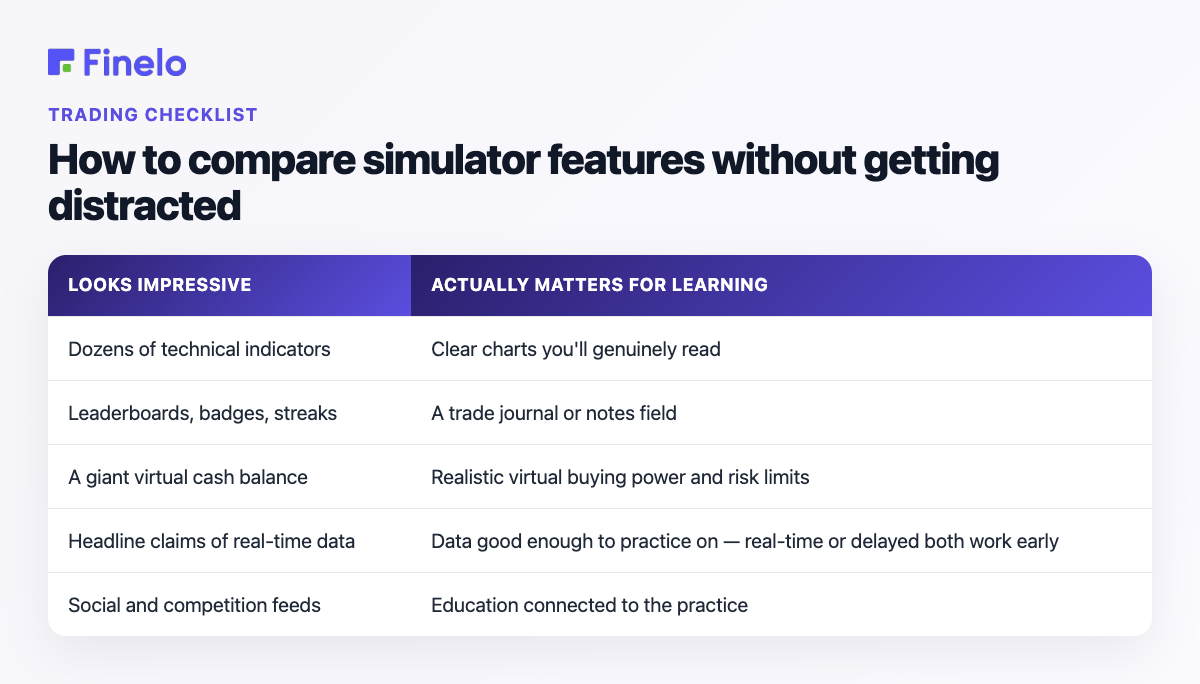
Beginners often pick a simulator by its feature list. A better filter is "what will actually help me practice decisions?" Most flashy features don't.
| Looks impressive | Actually matters for learning |
|---|---|
| Dozens of technical indicators | Clear charts you'll genuinely read |
| Leaderboards, badges, streaks | A trade journal or notes field |
| A giant virtual cash balance | Realistic virtual buying power and risk limits |
| Headline claims of real-time data | Data good enough to practice on — real-time or delayed both work early |
| Social and competition feeds | Education connected to the practice |
A couple of practical notes. A real market data simulator is nice, but a beginner learns the same decision habits whether the feed is live or slightly delayed, so don't let it be the deciding factor. And whether a tool is sold as a trading practice app, a practice trading app, a stock market simulator app, or a demo trading platform, judge it on whether it supports the loop above, not on the length of its feature list.
Here's a fast way to test one. Open it and try to place a limit order with a planned exit and a one-line note on why you took the trade. If that takes only a few taps, and you can find the same trade to review a week later, the tool is good enough to learn on. If you can't easily journal a decision or revisit it afterward, no number of indicators will make up for it.
How Finelo connects lessons with practice
Most simulators hand you a tool and walk away. The gap for beginners isn't the simulator; it's knowing what to practice and why.
That's what Finelo is built around. The Finelo trading simulator runs on real market data with virtual funds, and it sits next to short lessons and a built-in review habit, so each practice trade has a concept behind it and a review after it. The Finelo app keeps the lessons and simulator in one place, and the Finelo Challenges wrap the same observe-plan-simulate-review loop in a day-by-day path.
It's a place to practice decisions, not a brokerage account, and final trading and investing decisions stay yours.
Finelo is an educational product, not a brokerage. Brokerage connection availability depends on your region. The simulator uses virtual funds and real market data, and final trading and investing decisions are yours, made through your own brokerage account when you choose to act. This article is for education and is not financial advice.
Frequently asked questions
What is the best way to use a trading simulator?
Use it with a plan, not on impulse. Pick one skill, set realistic virtual rules and risk limits, and journal every decision so you can review it later. The fastest learners treat the simulator as a decision loop to rehearse, not a game to win, and study losing trades as closely as winners.
Can a simulator teach real trading?
Partly. A simulator is strong for mechanics and decision habits — order types, exit planning, position sizing, and review. What it can't fully teach is real-money emotion and live execution: spread, slippage, and the pressure of a real drawdown. Treat it as the first layer of learning, not a complete substitute.
Should beginners use real market data?
It helps, but it isn't the priority. A real market data simulator makes practice feel current, yet beginners build the same habits whether quotes are real-time or slightly delayed. Early on, the process of planning, journaling, and reviewing decisions matters far more than the data feed.
Is a trading simulator the same as a brokerage account?
No. A trading simulator uses virtual funds in a closed practice loop — no deposits, withdrawals, or broker connection. A brokerage account is where real money buys real trades, with real consequences. A simulator is for learning; a brokerage account is for acting.
TradingBeginner Guide
Practice trading with Finelo
Practice in a simulator, learn with bite-sized lessons, and build confidence before risking real money.
About the author
Mark
The Finelo Team creates practical investing and trading education designed to help beginners learn faster with structured challenges, simulator practice, and bite-sized lessons.
Keep reading — Related articles

Trading
Understanding Walk Forward Analysis in Trading
Brief educational note: this article is educational — not investment advice — and trading involves the risk of loss.
Finelo Team
Trading
VWAP vs Moving Average: Formulas, Uses, and Limits
VWAP weights price by recorded volume over a defined period, while a moving average summarizes a sequence of prices over a rolling lookback.
Finelo Team

Trading
Volume Profile vs Market Profile: What Each Chart Measures
Volume Profile groups traded volume by price level.
Finelo Team