A free stock market simulator lets you practise investing with virtual money instead of putting cash at risk. For most beginners, the best choice is a simple simulator with realistic market data, clear order controls, portfolio tracking, and guided learning. Use it to understand the process—not to predict returns or prove that a strategy will work with real money.
Discover the Best Free Stock Market Simulators for Beginners
A free stock market simulator lets you practise investing with virtual money instead of putting cash at risk. For most beginners, the best choice is a simple simulator with realistic market data, clear order controls…
6 min read
Practice trading with Finelo
Practice in a simulator, learn with bite-sized lessons, and build confidence before risking real money.
Want to learn more?
Practice in a simulator, learn with bite-sized lessons, and build confidence before risking real money.
Explore FineloExplore Finelo's 28-day challenges
Turn learning into a daily habit with guided challenge paths.
At a glance
- What it is: A practice environment for virtual trades
- Best for: Beginners learning orders, research, and portfolio decisions
- Possible assets: Stocks, ETFs, options, futures, currencies, and more
- Main limitation: Simulated results cannot reproduce every cost, fill, or emotion involved in real trading
- First step: Pick one skill to practise before opening a virtual position
Who Is a Stock Market Simulator For?
A simulator is useful if you want to understand how markets and trading tools work before making real-money decisions. You do not need previous investing experience to begin.
It may suit:
- First-time investors who want to learn basic terms and portfolio mechanics.
- Aspiring traders who need to practise entering and closing orders.
- Students and educators who want a repeatable market exercise.
- Long-term investors testing how different allocations change a virtual portfolio.
- Curious learners deciding whether a product or strategy fits their goals.
Start by writing one learning objective. For example:
I want to understand how a limit order works and when it may not fill.
That goal makes it easier to choose a suitable tool. It also prevents the simulator from becoming a game based only on chasing the highest virtual return.
What Can You Learn Without Risking Cash?
A stock market simulator, also called a paper-trading platform, lets you place practice trades in a portfolio that holds no real money. Some platforms use live prices, while others use delayed or end-of-day data.
Simulation can help you:
- Learn the difference between market, limit, and stop orders.
- Research an investment before making a decision.
- Build and monitor a watchlist.
- Plan an entry and exit before placing a trade.
- See how one holding affects a wider portfolio.
- Record decisions and identify repeated mistakes.
- Compare approaches under similar market conditions.
The most useful result is a more consistent decision process, not a large virtual balance. A lucky trade can reward a poor decision. A careful decision can still lose money. Review whether you followed your rules as well as whether the position gained or lost value.
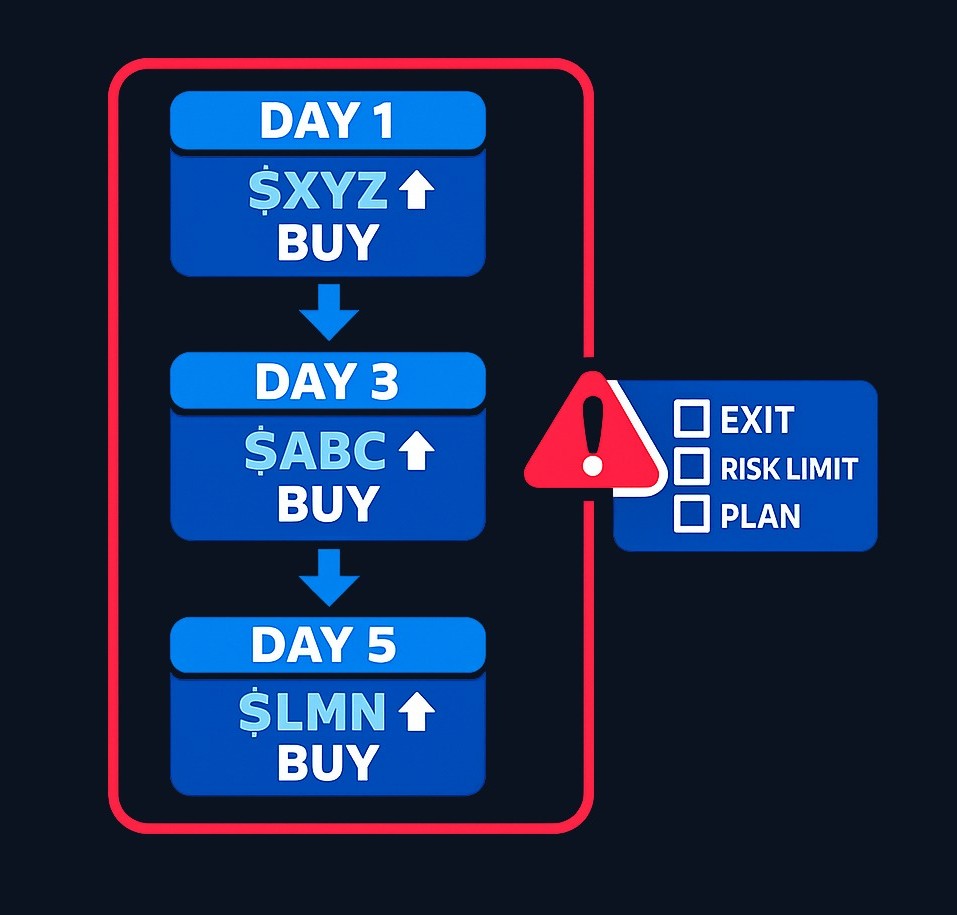
Finelo describes its learning experience as a combination of short lessons, quizzes, and risk-free simulations. Its site also positions the simulator as practice before making a trade (learn how the Finelo platform works).
Consider an illustrative beginner who buys whichever stock has risen most that day. A few gains may create confidence, but a trade journal could reveal inconsistent entries, concentrated positions, and no exit rules. Simulation becomes valuable when the learner notices those weaknesses and changes the process.
How Does Simulator Practice Work?
Most stock market simulators follow a similar sequence:
- Open a virtual portfolio. Check whether registration, payment details, or a trial is required.
- Choose an asset. Depending on the platform, this may include stocks, exchange-traded funds (ETFs), options, futures, or currencies.
- Research the decision. Write down why you are considering the position and what would change your view.
- Select an order type. Read the platform’s definition before submitting the order.
- Set a practice limit. Decide how much of the virtual account the position may use or risk.
- Place the virtual trade. Record the expected entry, exit, and costs.
- Review the result. Compare what happened with your original plan.
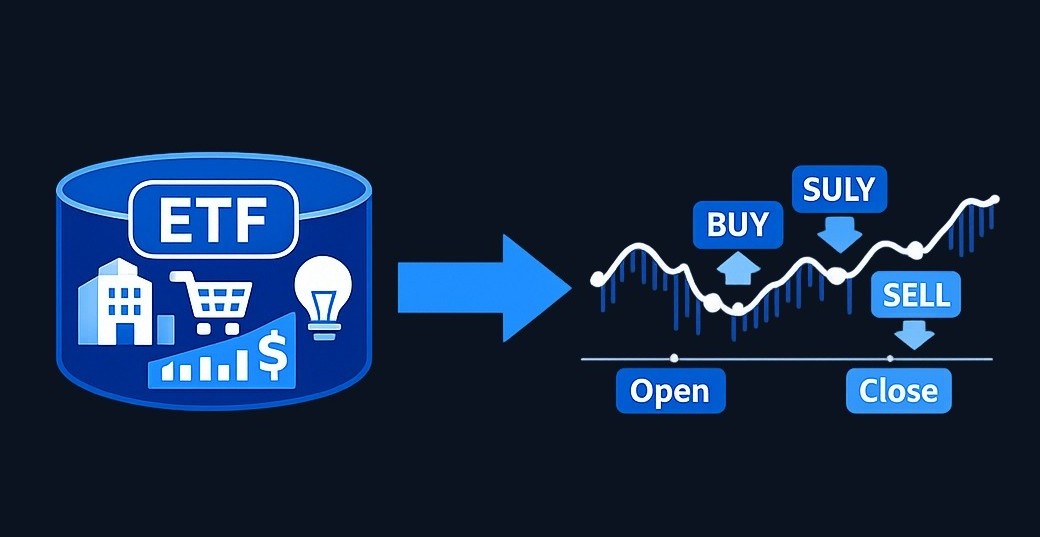
An ETF is a fund that trades on an exchange like a stock. Other products may work differently and carry different risks. Choose a simulator that explains the asset rather than assuming you already understand it.
A simple practice position calculator
You can use this worksheet before entering a simulated stock position:
Training risk budget = virtual account value × chosen training risk fraction
Risk per share = absolute value of entry price − planned exit price
Maximum simulated shares = training risk budget ÷ risk per share
Round the final result down to a whole share where necessary.
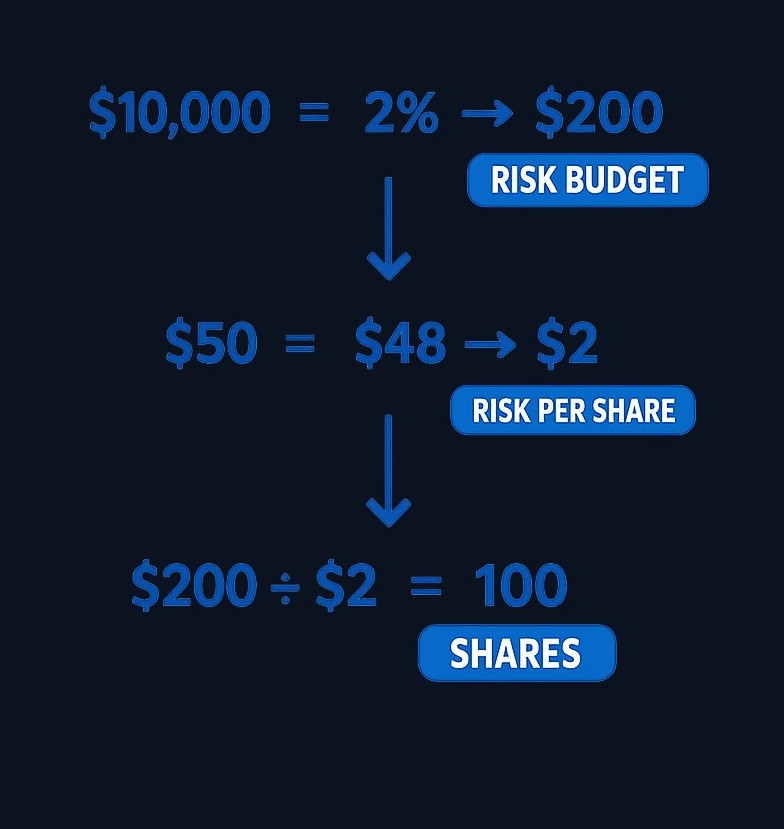
This calculation is a practice aid, not a recommendation for how much real money to invest or risk. It does not capture price gaps, taxes, fees, spreads, liquidity limits, or orders filling at worse prices than expected.
Practice trading with Finelo
Practice in a simulator, learn with bite-sized lessons, and build confidence before risking real money.
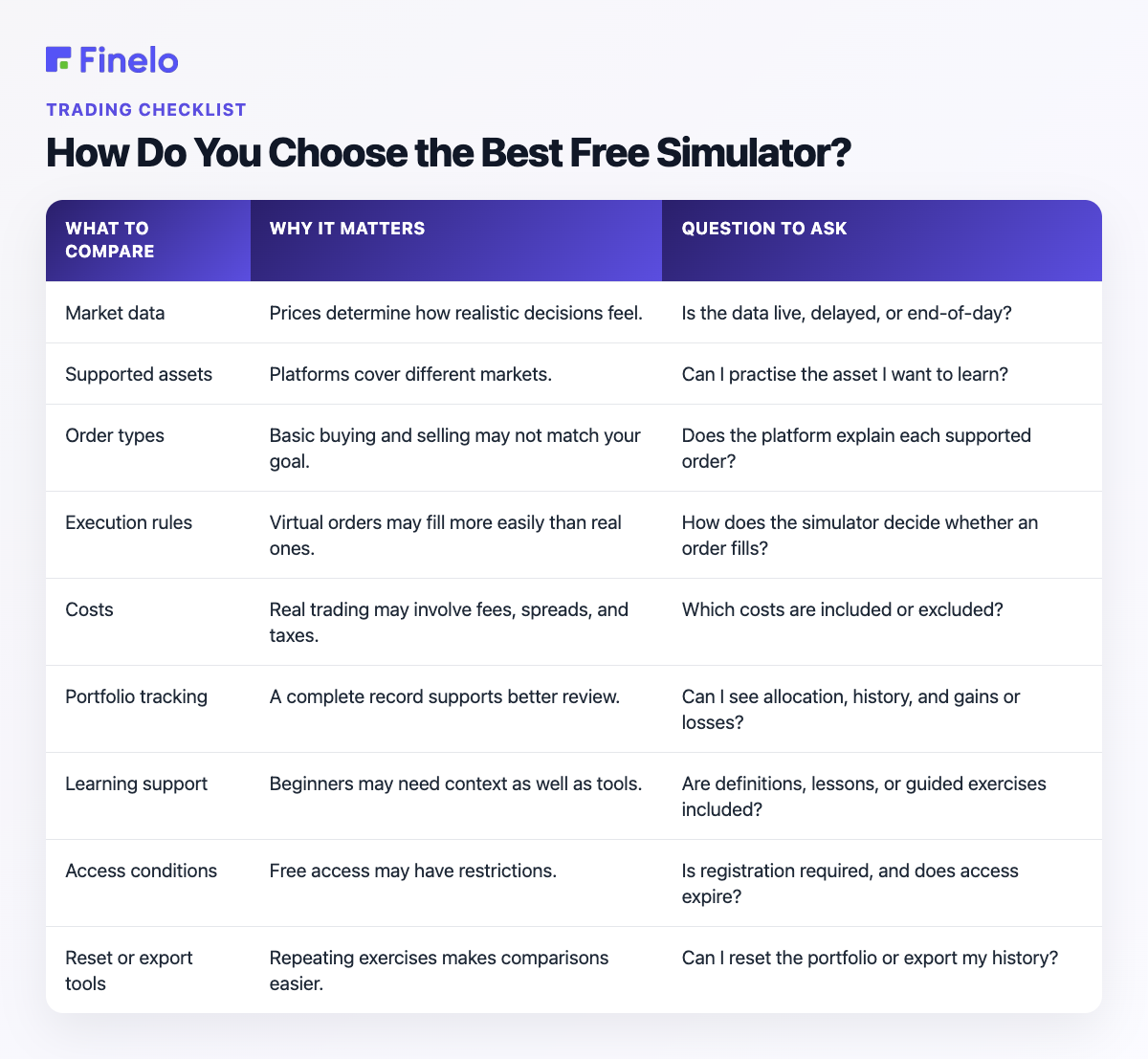
How Do You Choose the Best Free Simulator?
The best free simulator is the one that supports your current learning goal without adding unnecessary complexity. “Free” may not mean unrestricted access. A provider may require registration, use delayed prices, limit features, show advertising, or convert access into a paid plan after a trial.
Check the provider’s current terms before signing up.
| What to compare | Why it matters | Question to ask |
|---|---|---|
| Market data | Prices determine how realistic decisions feel. | Is the data live, delayed, or end-of-day? |
| Supported assets | Platforms cover different markets. | Can I practise the asset I want to learn? |
| Order types | Basic buying and selling may not match your goal. | Does the platform explain each supported order? |
| Execution rules | Virtual orders may fill more easily than real ones. | How does the simulator decide whether an order fills? |
| Costs | Real trading may involve fees, spreads, and taxes. | Which costs are included or excluded? |
| Portfolio tracking | A complete record supports better review. | Can I see allocation, history, and gains or losses? |
| Learning support | Beginners may need context as well as tools. | Are definitions, lessons, or guided exercises included? |
| Access conditions | Free access may have restrictions. | Is registration required, and does access expire? |
| Reset or export tools | Repeating exercises makes comparisons easier. | Can I reset the portfolio or export my history? |
Different simulator types suit different goals:
| Your goal | Simulator type to consider | Features to prioritise |
|---|---|---|
| Learn investing basics | Guided beginner simulator | Plain-language lessons, stocks and ETFs, portfolio views |
| Practise order entry | Broker-style paper-trading platform | Clear order tickets, supported orders, execution rules |
| Explore futures | Futures-focused simulator | Contract details, margin explanations, trading hours |
| Run a class exercise | Education or multi-user simulator | Assignments, rankings, teacher controls |
| Test a portfolio idea | Research-oriented simulator | Allocation tools, transaction history, performance comparisons |
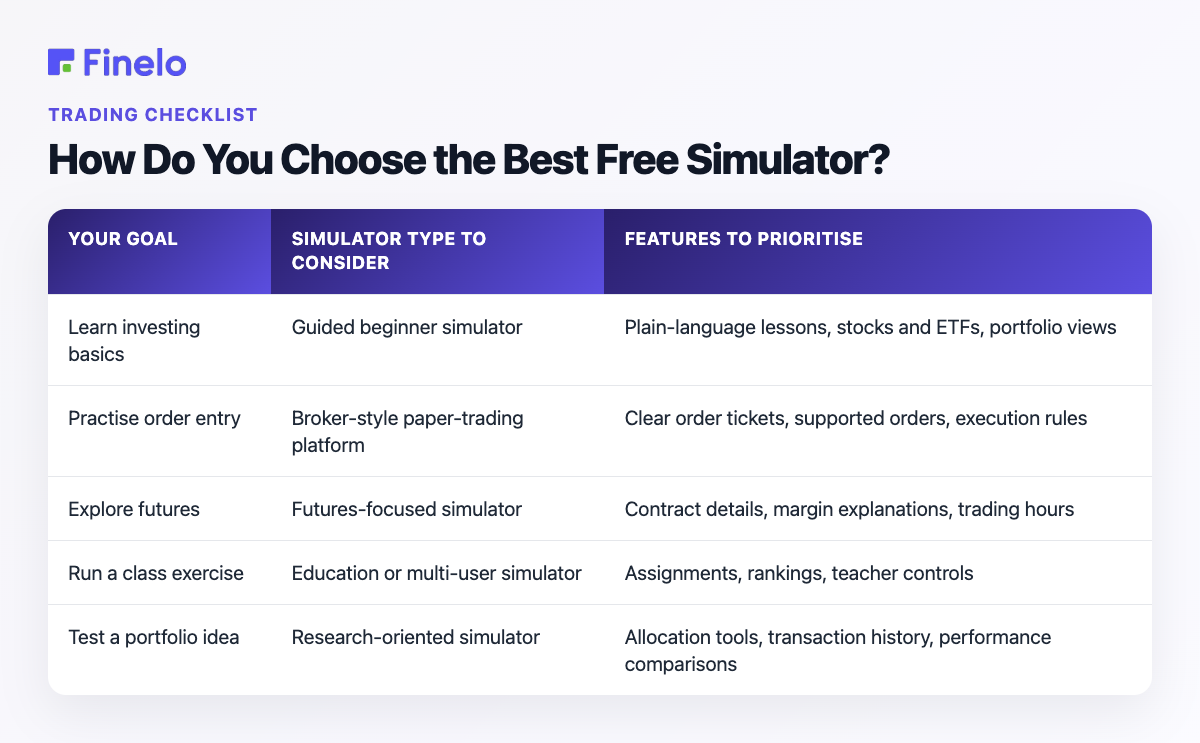
No single simulator is best for everyone. Choose the simplest option that teaches the skill you identified.
What Can a Simulator Not Reproduce?
A simulated account is not the same as a funded account. It may simplify the parts of trading that become difficult when real money and real orders are involved.
Important limitations include:
- Execution: A virtual order may fill faster or at a better price than a real order.
- Liquidity: The simulator may not fully model how difficult it can be to buy or sell without affecting the price.
- Costs: Fees, spreads, taxes, borrowing costs, and currency conversion may be missing.
- Market gaps: A real price can move past a planned exit before an order fills.
- Emotions: Virtual losses do not create the same pressure as losing money you earned.
- Risk-taking: Learners may take larger risks when there are no real consequences.
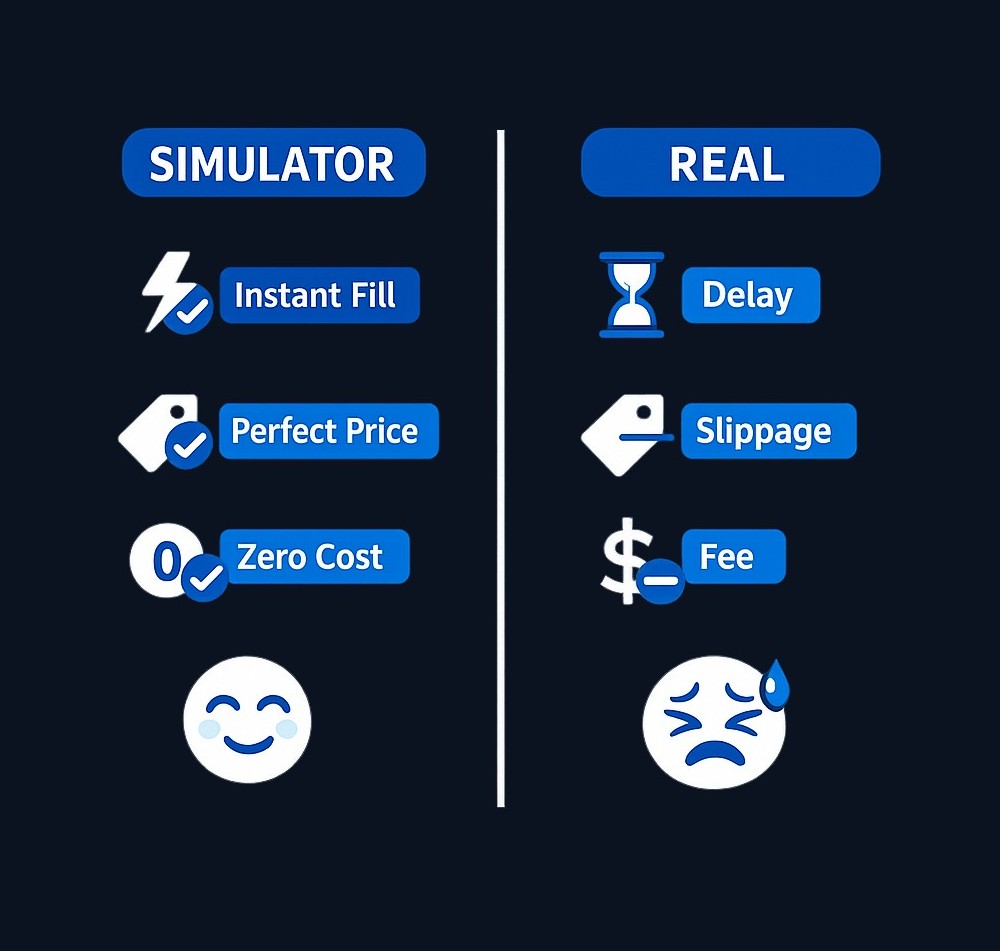
These differences can create false confidence. Strong simulated performance may reflect favourable conditions, unrealistic fills, excessive risk, or luck. Treat it as information about your practice process, not evidence of future returns.
Moving from simulation to real-money decisions
Use a gradual process:
- Focus on one repeatable skill or strategy.
- Write your entry, exit, and risk rules before each virtual trade.
- Practise the same process across multiple decisions.
- Review rule-breaking, concentration, costs, and outcomes.
- Add realistic spreads, delays, or worse fills where possible.
- Confirm real account rules, product risks, costs, taxes, and local availability.
- If you later use real money, begin with lower stakes and only use money you can afford to lose.
You do not have to move to real trading. A simulator may help you decide that a product, strategy, or level of risk does not suit you.
Start with One Clear Practice Goal
Choose one skill, write a short checklist, and review every virtual decision against it. Finelo states that its AI Investing Challenge includes simulator practice with real market data and virtual funds. The same page explains that the product is educational and does not place real trades, manage money, or connect to a brokerage account.
Start the AI Investing Challenge
Investing and trading involve risk, including the possible loss of principal. Educational tools do not provide personalised financial advice or guarantee future results.
Frequently asked questions
Are stock market simulators really free?
Some simulators offer free access, but the conditions vary. A provider may require an account, restrict features, delay market data, or introduce payment after a trial. Check the provider’s current pricing and access terms before registering.
Can I practise without risking real money?
Yes, if the platform uses only virtual funds and does not send orders to a brokerage. Confirm this before entering payment or brokerage details. Remember that unrealistic fills and missing costs may make simulated performance look better than real trading.
Which assets can I trade in a simulator?
It depends on the platform. Common choices include stocks and ETFs. Some simulators also cover options, futures, currencies, or other products. Start with a platform that clearly explains the asset, its mechanics, and its risks.
Is paper trading good for beginners?
Paper trading can help beginners learn order mechanics, practise a written process, and review mistakes. It is less useful when treated as a game or proof that a strategy will make money. Measure progress by decision quality and rule-following, not only by virtual profit.
TradingBeginnerPractice TradingMarket BasicsMarkets
Practice trading with Finelo
Practice in a simulator, learn with bite-sized lessons, and build confidence before risking real money.
About the author
Finelo Team
The Finelo Team creates practical investing and trading education designed to help beginners learn faster with structured challenges, simulator practice, and bite-sized lessons.
Keep reading — Related articles
Trading
Understanding Walk Forward Analysis in Trading
Brief educational note: this article is educational — not investment advice — and trading involves the risk of loss.
Finelo Team
Trading
VWAP vs Moving Average: Formulas, Uses, and Limits
VWAP weights price by recorded volume over a defined period, while a moving average summarizes a sequence of prices over a rolling lookback.
Finelo Team
Trading
Volume Profile vs Market Profile: What Each Chart Measures
Volume Profile groups traded volume by price level.
Finelo Team